
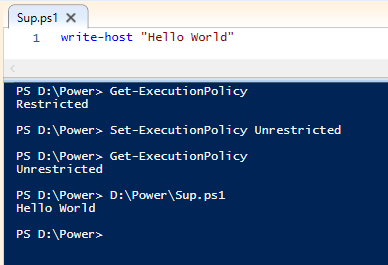
Lets use the title image of this page as the a starting point. Let’s talk about Execution Policies.
PowerShell scripts, though useful, could be packed with loads of commands, and functions we don’t want running on our system. To help protect users from attack, the execution policy by default should be set to restricted.
So what does “Restricted Mode” do?
When the policy is set as restricted, simply, no PowerShell scripts are allowed to run. If you try you are presented with a message that tells you this.

Keep in mind you can still run your cmdlets.
You can check the mode you are set in by getting the current execution policy with the following Command:-
PS> get-executionpolicyThe output will tell you which mode you are set to. If not in a dev Environment, this should say “Restricted”
So let’s quickly talk about those modes!
- Restricted
- Scripts are no allowed to run, good luck testing your personal scripts in this mode 🙂
- AllSigned
- Your script must be signed, this does not really add a ton of security, but you do get to select if you trust the scripts publisher before running.
- RemoteSigned
- In this mode, if you created a script, it will run! However any scripts you have pulled down from the WWW will not, unless signed by a trusted publisher.
- Good question, how does it know! I suppose we should go into what meta data there is at some point in the future.
- We should also look at what a trusted publisher is, and how does your system know this.
- In this mode, if you created a script, it will run! However any scripts you have pulled down from the WWW will not, unless signed by a trusted publisher.
- Bypass
- Everything runs… Great in labs … well maybe not great. You must remember that this mode is pretty bad for security, and does not reflect most systems. Great for POC’s, however the POC would need to be modified to meet the other modes above.
- Unrestricted
- This is a “looser” mode than RemoteSigned. Essentially if it came from the WWW
- Undefined
- The system default will be used, which should be “Restricted”
Ok so that is great, what next?
You now have most of the details for running your first PowerShell Script! You now can set the system execution policy to a mode as detailed above.
If you are familiar with PowerShell, you probably already know that Get and Set are 2 Verbs that switch between writing a value and reading a value. If not here is the next step.
Set-ExecutionPolicy RemoteSignedCool! You can now run that first hello world script. It is a very simple script.
Write-Host "Hello World"Once you have placed this into PowerShell ISE and saved the file the output in the console will result in the terminal printing “Hello World”.
Once you have done this test I recommend that you change the execution policy back to how it was before. Do this with the following Command.
Set-ExecutionPolicy RestrictedFirst Post done.
NOTES:-
- Run in a Lab Environment
- Privielges were elevated to Administrator when changing execution policy
- UAC is enabled
 Blue-Lab