

This post is more of a write up than a thought piece.
This post goes over the Try Hack Me Room; Recovering Active Directory.
<Rant>
While I write this post I hit a challenge, the main challenge being how disappointed I was with this room. The practical’s are weak. The advice and guidance is also lacking in areas that I believe are important points to cover off. I would genuinely be concerned for an organisaiton if during response these were the key points and recommendations.
So lets first look at why I was disappointed, as I want to be able to cover off a this subject as objectively as possible. Something I noticed was the lack of attention to detail around active directory and well documented and known attacks, which are still present today. We know they are still present due to vulnerabilities that exist in Active Directory that Microsoft find challenging to escape with out an overhaul of authentication mechanism (Enter Entra!… well kind of).
The Room it self has several pre-reqs, and those pre-reqs have pre-reqs. I decided not to ruin the room, the surprises, the challenge, so regrettably followed the pre-reqs path.
Lets cut this story to the point, I wanted to get an in depth look at AD Recovery, so I skipped 40% of the pre-reqs and went for it. I found that the room was not what it claimed to be. It was weak. The practical’s were weak and as already said, the Guidance was weak. Maybe because the room is supposed to be intermediate, yet the examples were at their most challenging, “easy”. Maybe it was because the major focus that had any complexity was silver ticket, completely missing the persistence of Golden Ticket, Synchronisation, SDHolder, and more importantly the remediation of said exploitation.
Ok with that all said, and the rant out of my system, the room did offer some guidance, which I will summarise here. If you ended up at this page for the title, because you are in a “situation” then PLEASE consider talking with a response and remediations team/s. Evicting an attack is a challenging time for any organisation, so get the right support.
</Rant> Learning Summary
The room covers some immediate actions to collect data for forensic analysis (kind of) and looks at some basic log analysis and recovery options.
Task 2
The Recommendations in task 2 focus on :-
- Isolate the Server/s as a containment measure.
- No real detail on this, but this could be performed across multiple layers of your defenses. Such as Perimeter Network controls, Policy, host based perimeter controls, account changes, privilege changes etc.
- Use wbadmin.exe to perform an immediate full backup of the system.
- The idea is you can use this to restore to previous state and analyse in a sandboxed environment. Depending on the architecture you may find that you have other capabilities to snap shot the system, but using a tool you know exists isn’t a bad way about it. You may find on some hardened systems that the service hasn’t been enabled or does not exist.
- Restore the System to a known good backup (if you have one)
- Absolutely, however you need to identify when is “Good” as TA dwell time is a consideration. Don’t forget, restoring an old directory is also restoring old passwords… which could have been captured, so there is some sanitisation that needs to be performed.
- Monitor the System. Essentially the server is classified with a traffic light system at this point, meaning if it is red, it is bad, yellow uncertain/working on/ Green identified as Clear.
Task 3
The Recommendations in task 3 focus on :-
- Review the Event log for indications of TA Access
- Use tools to discover your AD Environment (e.g. Bloodhound)
- Nicely it lists how you could use Bloodhound as a Threat Actor, and ultimately this identifies how you could use it to get a better understanding of your domain. Bloodhound itself has some great features. Personally I like the visual representation, and then the ability to run my own queries against its DB.
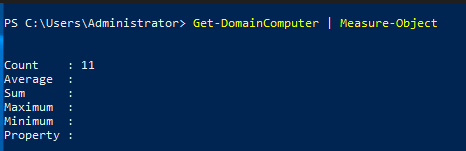
- The task then uses a Powershell Module from the PowerSploit git repo. Arguably you could write the scripts yourself, however the modules do offer data points that you are typically going to check. The objective is to identify the number of machines, I used the module and then Piped to Measure-Object.
- In the task you may want to use some of your powershell skill to avoid truncation of data.
- Note that PowerSploit is archived now (as of 2021) https://github.com/PowerShellMafia/PowerSploit/tree/master/Recon
Task 4
The Recommendations in task 4 focus on :-
- Check accounts modified and created
- Checks Systems Added to AD
- Checks for Changes to Group Membership
- Checks for Changes to Group Policy Objects (GPOs)
- The Task gets you to hunt for the email address of the account evil.guy, to do this I used the following
- One thing to note is once you get this first piece of information, you will want to change the string and identify what you want to select. <— Below screenshot should get you going in the right direction
- If you want a bit more of a hint, you want to get the full output of the account and look for the attribute. To give your self the challenge, I would say choose another AD account in the lab first to identify the attribute required, the run some powershell to grab the account and specific attribute you are looking for 🙂

Task 5
The Recommendations in task 5 focus on :-
- Reset Tier 0 Accounts
- What are Tier 0 Accounts you may ask? Well to keep it high level, these are accounts that have privielged access to the likes of Active Directory. Tiering models (essentially Bell LaPadula) Avoid exposing information from a higher tier to a lower tier, and stop a Lower Tier from accessing a Higher Tier. The lower the number the higher the Tier.
- Note to me, write some stuff about the practicality of Tiering when you aren’t in the military. 🙂
- Investigate Logs for suspicious activity (new accounts with group memberships or special permissions)
- Reset the Kerberos service account
- This is the krbtgt account. This account is the root of trust for Kerberos tickets. It is important that this account is reset twice, the activity does not mention this. Note that performing this against an environment where applications do not restart authentication automatically, (if it errs or has an invalid ticket) can stop those services and/or applications from running. You must also be aware of replication between Domain Controllers.
- Reset Administrative Accounts, though it is not said in the task, and the focus is on AD, I can only assume they were talking about Tier 1 accounts.
- Reset Machine passwords
- Looking for machine objects that may have privilege is an important task. For example, you could add a machine object as a member of a domain group , and then using that machine object perform activities against the domain.
- Reset DC Machine Object account to avoid kerbroasting.
- Domain Controllers are the essential element for protection and recovery. If you have configured a writable domain controller (DC) as a backup for a compromised one, you can restore it to avoid disruption (Be careful while performing this step. Do not restore an instance of a compromised DC).
- Perform malware analysis on any targeted domain controller server for identification of malicious scripts.
- This will include the use of Endpoint Privilege Management, Endpoint Detection and Response, Collection Agents, Group policy and more.
- Verify that the attacker has not added any scheduled tasks or start-up applications for persistent access.
- Check Event Logs… a bit of a reapeat topic
- Filter Network traffic at host and network perimeters. Best is to start at a network perimeter to avoid implants detecting a change like this.
Task 6
Boot source in BIOS
- This assumes the attacker may have physical access to the system, and rightly so! the attacker could have this level of access. Secure boot order and using the right controls will help mitigate such an attack. Disable device, or better yet, just remove them.
AD Server Administrator Group Members
- Define access to all systems across Tiers, do this with GPO setting the “Allow log on locally” policy that allows you to select a specific user or group who can log on on a particular computer, group of computers, and Tier.
Weak Passwords
- Avoid Crackable Credentials (e.g. Randomisation and key length) PAM can help achieve this goal.
- Do not confuse your password profiles, end users should go with Pass Phrases, or Passwordless (hate the name, it lacks truth. You couldn’t call it “Secretless”).
Preventing DCSync Attack
- The DCSync attack enables an attacker to impersonate a domain controller and receive requests on behalf of that domain controller. This includes initiating a replication.
- A DCSync attack can be prevented by identifying accounts that have permission to replicate information in the domain.

Scripts and Applications Permissions on Workstations
- Principle of Least Privilege. Control what can run and what privilege a user needs. Endpoint Privilege Management tools offer this type of control. Reduce the need to Detect and respond with these controls… but still EDR is needed for cases where in policy access has been abused or exploited.
Configure Network Time Synchronisation
- NTP!
- Logs are bad without NTP.
Task 6
I’m gonna say it… This section is a tad ropey at the beginning, you wouldn’t develop a plan just yet. You would review the recovery, identify what you learned, review what you have and build this into your preparation… which then helps form a plan.
Policy Decisions
- A detailed cyber security plan must be developed in line with some international frameworks like NIST.
- Develop a
disaster managementPlan of action that has goals and outcomes based on the lessons learned from the incident.- Perform Root Cause Analysis of incident and audit the infrastructure to identify security gaps.
- If you don’t have a Disaster Management Plan create one to identify what to do during the next Cyber Incident.
- Ensure that logs from all the servers, computers, and network devices are maintained and forwarded to a reputable SIEM solution.
Domain Controller
- Check for Vulnerabilities
- Keep systems up to date with latest Security Patches
- Defend system with strong host based controls ( EDR, EPM, AV, SysLog)
- Defined Routes, Firewall Polices for Network traffic
- Define users policy for system access
- Define a Tier of users and role based access to the systems.
Backups
- Make sure you have implemented availability of the IdP.
- Implement automated backup and define recovery mechanisms and processes. (Who can initiate such work)
- Encrypt and verify backups for Confidentiality and Integrity.
Implementation of CIS benchmarks
The Center for Internet Security (CIS) has established benchmarks to help secure computer systems. They audit your implementation and report back on the current system hardening. you cans use this to measure your security control against a baseline. However, keep in mind that you likely want to tailor that suit off the rack.
Hopefully you found this take on the room a bit more informative. I want to go through this again and add in further recommendations to follow. For now though, Have a good day, and keep sparring! 🙂
 Blue-Lab