

Back to it!
Ok so in Summit you are playing the role of an analyst, you need to investigate a variety of system information to identify the threats presented during a Purple team exercise.
Link for those who want to give it a shot :- https://tryhackme.com/r/room/summit
As this task is relatively straight forward, I am mostly going to show the examples and where you would go to perform an action. Where Context can be provided, well, I will 🙂
Sample1.exe
For Sample1.exe you will want to identify more about the malware. In this case we have the file hash MD5, SHA1, and SHA256. You can use PicoSecure (what is spun up for the lab) to sandbox the Malware.
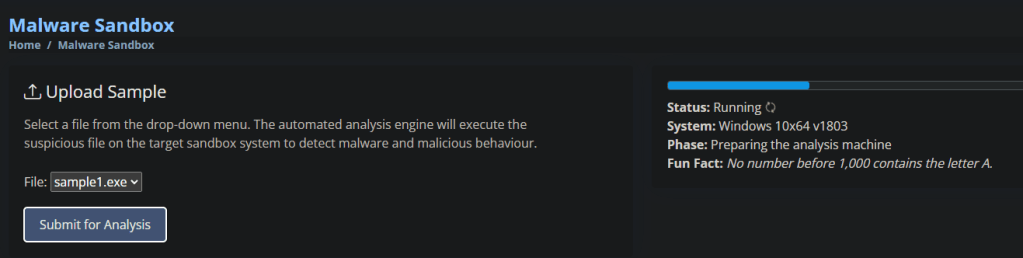
Once Sandboxed you are presented with some analysis and the hashes of the file. Adding the hashes to PICO will terminate and block threats form this type of exe.
A little bit broken as a sec control, as the system shouldn’t have allowed unapproved exe’s running in the first place, but equally this is an effective reactive control, potentially a legitimate software has been poisoned and the supply chain ultimately is also poisoned.
With all that said, Grab the hash and you can complete Flag 1!
Sample2.exe
Sample 2 has a similar starting point, Analyse the file to identify the threat.
The Purple Team lead has requested that a different method is used this time to eliminate or contain the threat. The sample is the same as Sample1.exe but has been recompiled leading to a different file hash.
After sandboxing the sample this time, we can see there are network activity identifiers.
This means we want to look at firewalls. What is coming in, what is going out.
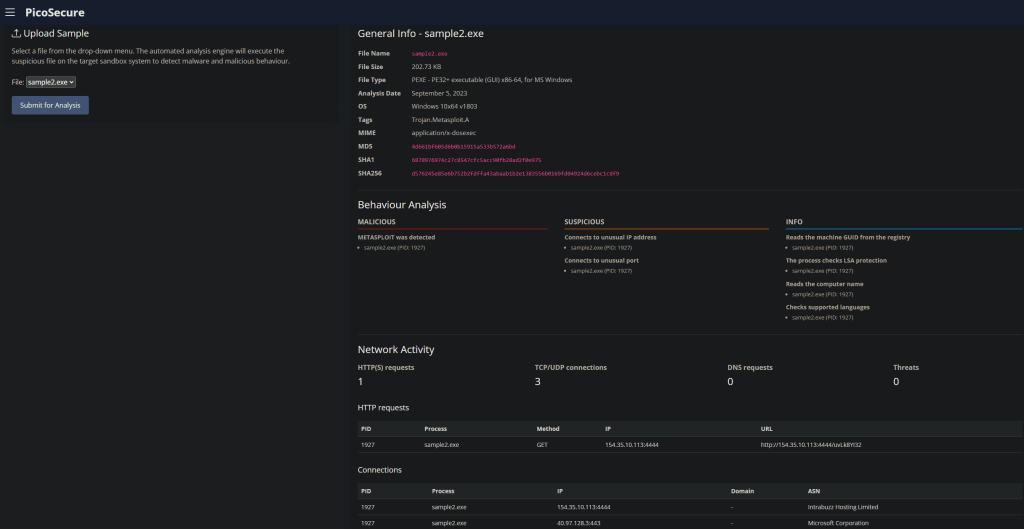
So we can see ASN (Autonomous System Number) for one IP is linked to Microsoft, and the other is, well unknown. I could investigate this further, see what I can find out about Intrabuzz… but we know what this task is about 🙂 Outliers and Oddities.

Pow
Flag complete (check the game inbox)
Sample3.exe
For this task the Purple Teamer has decided to avoid static IP (kinda) as we were able to very quickly stop the malware by updating Firewall rules. But Human readable names, as those provide by DNS are problematic here. Why you may ask? Well I can as the attacker can associate a different IP to the name that is trying to be resolved. This can lead to circumvention of Firewall rules and ultimately lead to a loss of containment.
The in the email the Attacker explains they have moved to a Cloud provider, so feel free to block a Public IP, they will get another 🙂
OK, Malware analysed!
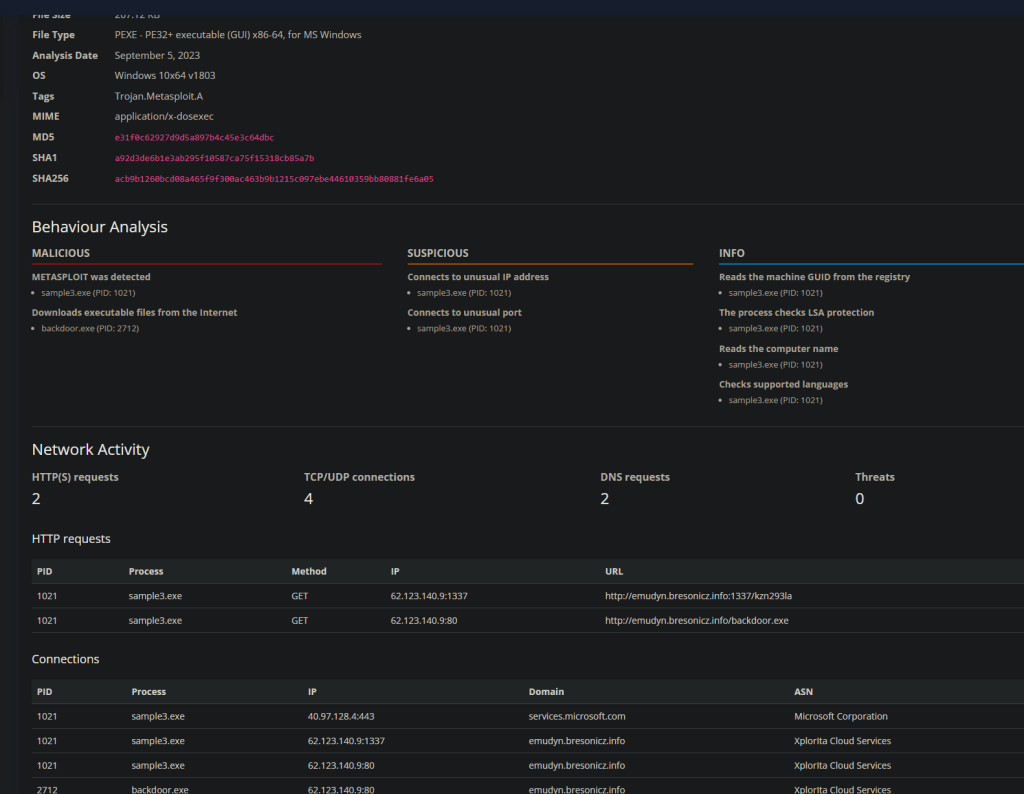
Look at that, something common to set a rule against
the URL emudyn.bresonicz.info looks pretty SUS and likely where I am going to go next to limit the Malwares capability.
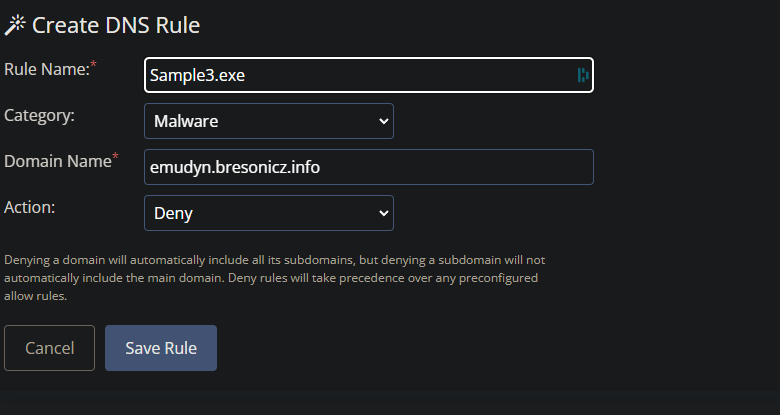

Done,
Go to the inbox, get your flag 🙂
Sample4.exe
Ok with Sample 4
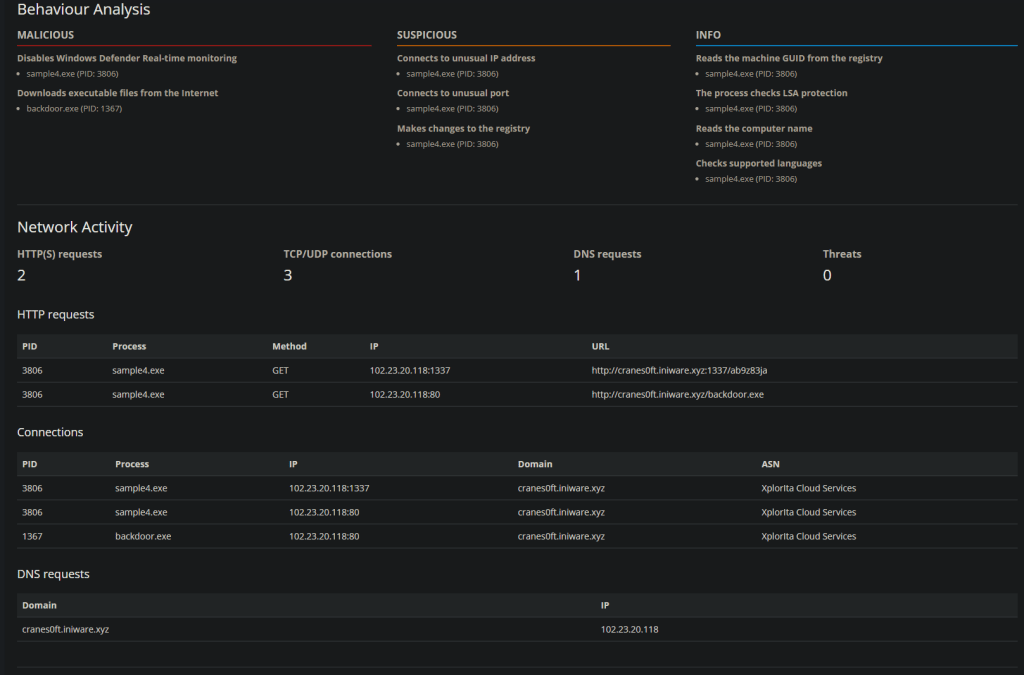
This sample is more aggressive, disabling real time monitoring and downloading data from t’internet.
The Attacker in this case has said they will chase you around by adding new Domain names if needed, so we need to find yet another way of stopping the malicious activity.
The clue here is to start looking at behavior or conditions of access. By that we are looking at what changes is the software making, and is the software allowed to do that, if the software is on the nice list.
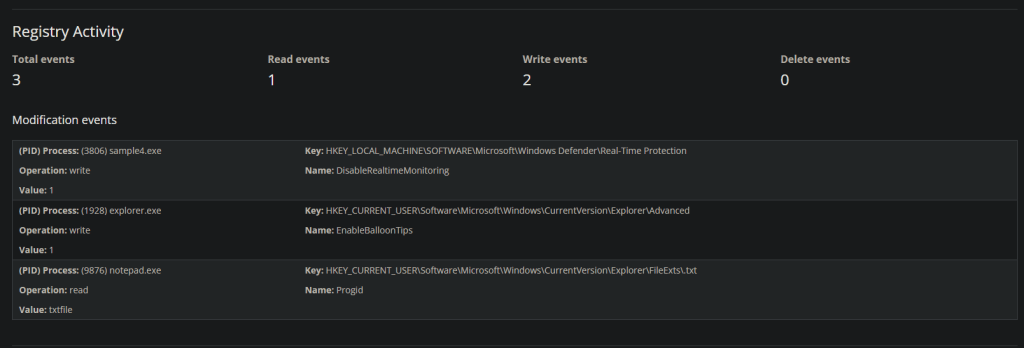
We can see there are some registry modifications being made. As a reminder, the windows registry is where configuration details are stored about how the system behaves. in this case we can see that the reg key changed is to turn off Realtime monitoring. Other than this the registry can hold credentials (urrrrgh), License keys, manufacturer details, etc. it is a huge hive of information.
A nice attack is where you use the registry to modify the identifying bits for an Admin account, or morte accurately change a standard user accounts details to so the system reads interprets the account as one that can request Admin tokens.
Ok back to the point.
We are going to create a Sigma Rule! It’s going to look something like this
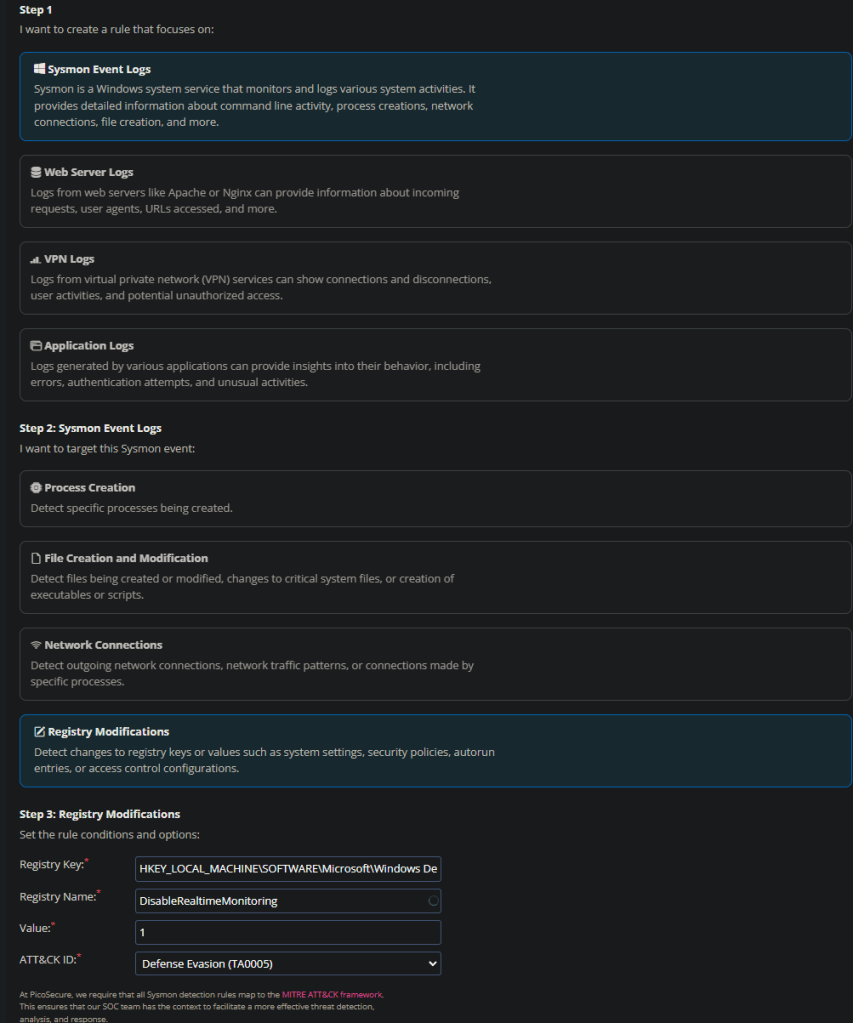
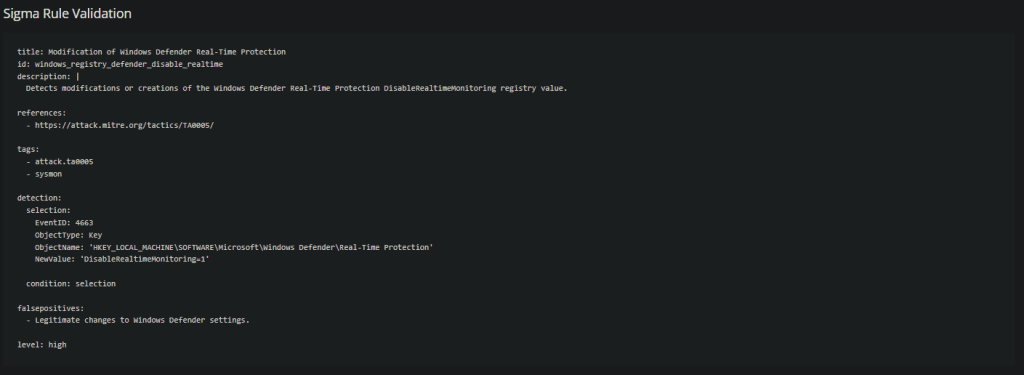
And that is that, the modification of the key is enough to
Sample5.exe
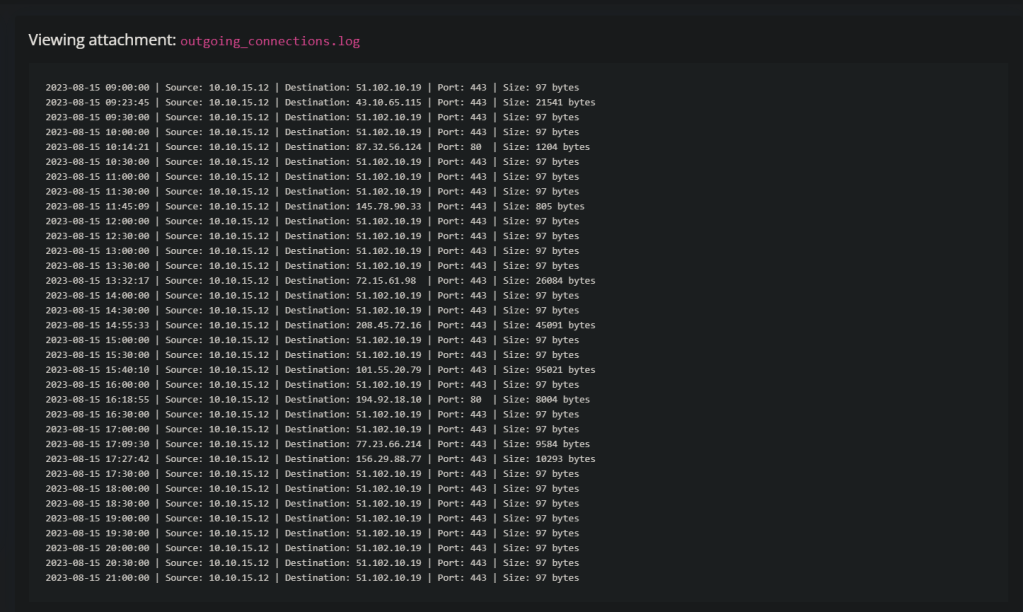
This one provides me with some log data. I am looking for outliers here, there are a few indicators of port 80 being used. There is traffic on 443 traffic, and there seems to be equal intervals…
I am going to focus on the 443 97 bytes traffic. This looks like a heartbeat check, similar to what C2 Beacons perform.
In sigma I have a network connections rule. I know that DNS, IP and Ports are no longer any use to block… so I will have to blanket approach this. With the theory of it being a C2 I can only really choose Command and Control from the Mitre Framework.
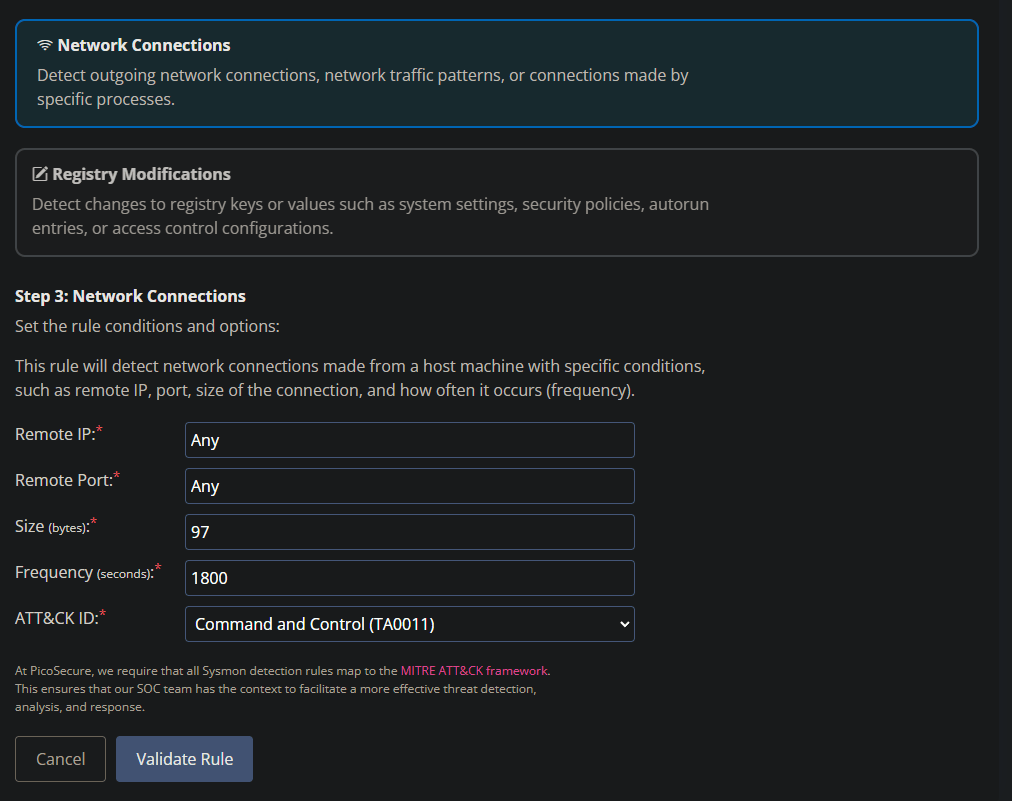
And what do you know! it worked.
Collect the flag from your inbox.
Sample6.exe The last Sample
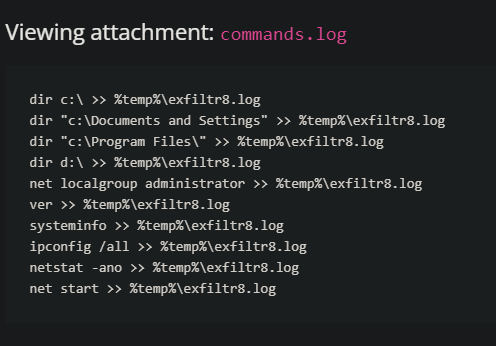
So Sphinx (actually the attackers name in this), has given a sample of commands that re logged out from some malware
Sphinx wants to know what they are doing and what patterns they could change.
The logs show that there is a common log file create in a common directory.
Will try a Sigma rule for this.
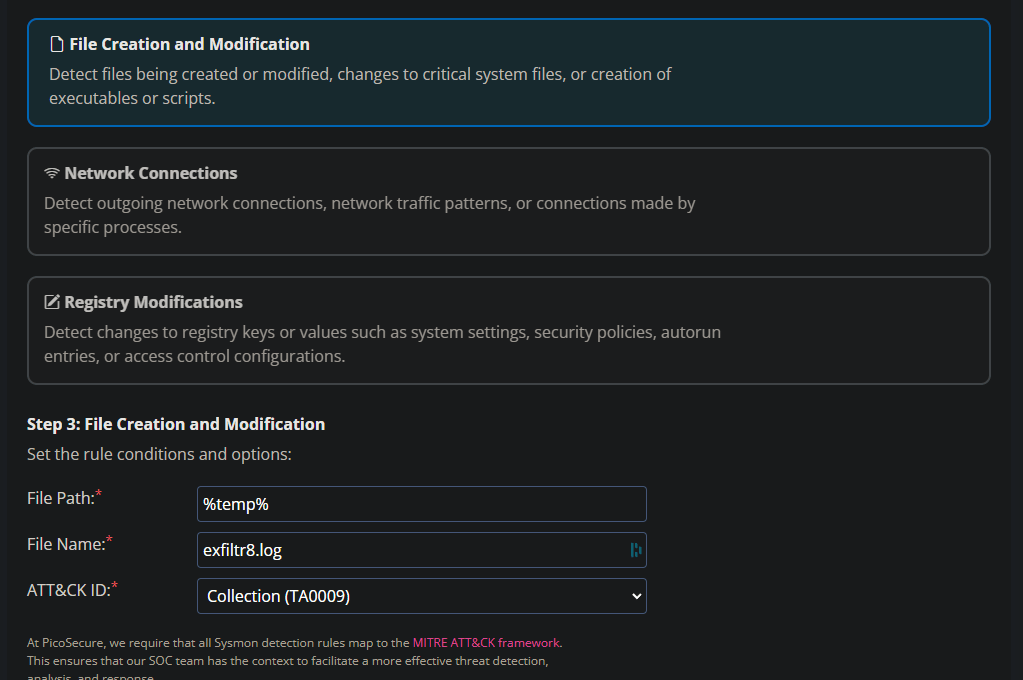
Yup that did it. WE are looking for the specific name in a file that can be found using systems variables ./… e.g. %temp% 🙂
That was Fun! Hope you enjoyed it.
 Blue-Lab