
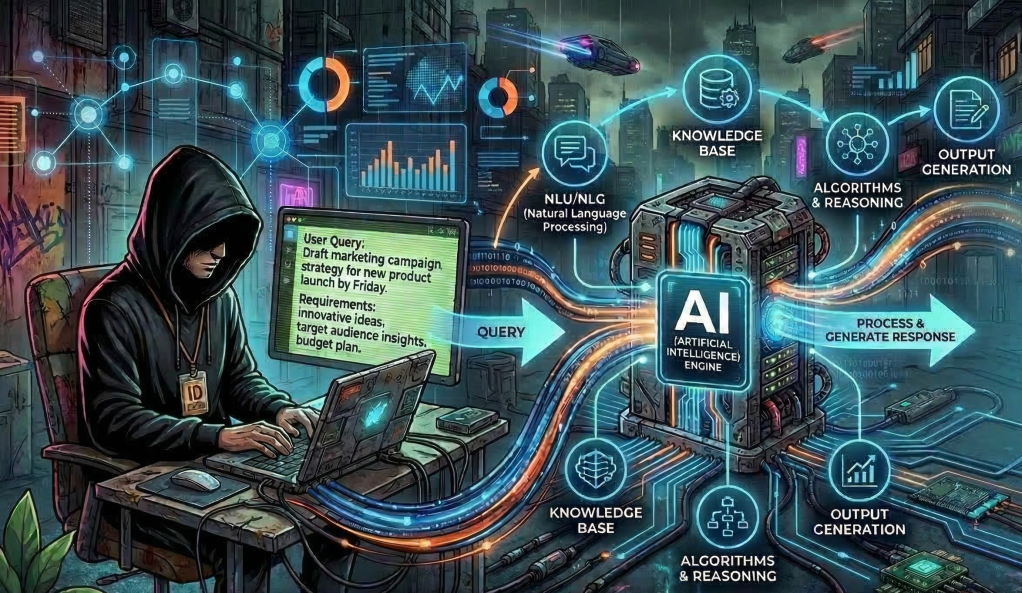
A reference guide for future me, so I never have to re-learn this.
The One-Line Versions
- A prompt is a single instruction to an AI.
- A skill is a reusable set of instructions that makes the AI reliable at a specific task.
- An agent is a program that has an LLM in its loop.
Everything below is expanding on those three lines.
Prompts: The Starting Point
A prompt is the simplest interaction with an AI. You type something in, the AI types something back. No structure, no memory, no tools. Just words in, words out.
It works fine for one-off tasks. The problem is consistency. Ask the same question twice and you might get two completely different formats, lengths, and levels of detail. There’s no quality control, no guardrails, and no repeatability.
A prompt is like shouting an order at a stranger. They’ll probably do something helpful, but you’ve got no guarantee of what.
Skills: Prompts That Grew Up
A skill is what you get when you take a prompt and package it with rules, structure, examples, and best practices. It’s a reusable instruction file that the AI reads before it responds, so it does the task the same way every time.
A skill typically includes:
- When to use it — a description of what triggers this skill
- How to do the task — step-by-step instructions
- What to avoid — common mistakes and anti-patterns
- What good looks like — examples of the desired output
Here’s the thing: if you’ve ever built a Custom GPT in ChatGPT, a Gem in Gemini, or a Project in Claude, you’ve already built a skill. The platforms brand them differently, but they’re all the same thing — a set of instructions the AI reads before responding.
| Platform | What they call it | What it actually is |
|---|---|---|
| ChatGPT | Custom GPTs | A skill with a UI wrapper |
| Gemini | Gems | A skill with a UI wrapper |
| Claude | Projects / System Prompts | A skill with a UI wrapper |
| Copilot | Copilot Agents | A skill with a UI wrapper |
The difference between a raw skill file and a Custom GPT is just packaging. The skill file is portable text you can version control and use anywhere. The Custom GPT is locked into OpenAI’s interface. Same core idea.
Skills Sit on a Spectrum
Not all skills are equal. They range from simple to sophisticated:
Level 1 — Basic skill. Text in, formatted text out. “Here’s an email, give me a summary in this specific format.” No tools, no decisions. Just reshaping words consistently.
Level 2 — Skill with tools. The AI can now reach out to external systems. “Summarise this email, check my calendar for conflicts, and draft a reply.” Still one job, but pulling in outside data to do it better.
Level 3 — Skill with logic and branching. The AI makes decisions. “If this email is urgent, Slack me. If it needs a meeting, suggest times. If it’s FYI only, archive it.” Different inputs produce fundamentally different actions.
And Level 3 is where skills start to feel like something more. That “something more” is where agents begin.
The Logic Question: AI or Program?
When a skill has branching logic — “if urgent do X, if FYI do Y” — there’s a critical question: who handles the logic? There are three approaches, and understanding them matters.
Approach 1: The AI is the logic. You write the rules in plain English and trust the AI to follow them. No code. The AI reads “if urgent, Slack me” and decides whether the email feels urgent. This is easy to build and flexible, but sometimes unpredictable.
Approach 2: A program is the logic. Traditional code runs the show. The AI is called as a small function inside a script — “classify this email” — and the program handles all the branching, routing, and tool calls based on the AI’s classification. This is predictable and testable, but rigid.
Approach 3: Hybrid. The program handles the structure and critical decisions. The AI handles the fuzzy thinking. In practice, this means the AI reads the email and returns structured data (a JSON object with category, urgency, confidence), and the program makes hard decisions with that structured data. If confidence is low, the program routes to a human. If the category is urgent, the program calls Slack. The AI provides the intelligence. The program provides the reliability.
Most real systems use Approach 3. The AI is good at understanding messy human language. Code is good at making reliable, repeatable decisions. You play to each one’s strengths.
Agents: The Fundamental
Here is the key insight that everything else builds on:
An agent is a program that has an LLM in its loop.
Not the other way around. The program is in charge. The LLM is a component inside it — the thinking component — but the program owns the loop, the state, the scheduling, the tool calls, and the control flow.
┌─────────────────────────────────┐│ PROGRAM │ ← this IS the agent│ ││ 1. Receive a trigger │ ← program│ 2. Load state from database │ ← program│ 3. Call the LLM: "what now?" │ ← LLM (the thinking bit)│ 4. Parse the LLM's response │ ← program│ 5. Execute the action │ ← program│ 6. Save new state to database │ ← program│ 7. Schedule the next check │ ← program│ 8. Go to sleep │ ← program│ ││ Step 3 is the only part ││ where AI is involved. │└─────────────────────────────────┘Seven out of eight steps are normal software engineering. The AI only shows up at the point where you need human-like judgement that’s too messy to write as traditional if/else logic.
Where “Skill” Ends and “Agent” Begins
| Trait | Skill | Agent |
|---|---|---|
| Number of jobs | One | Many, chained together |
| Who decides “what next?” | The user or program | The agent itself |
| Maintains state over time? | No (stateless) | Yes (remembers context) |
| Wakes up on its own? | No (called once) | Yes (scheduled, triggered) |
| Can it fail and recover? | Not really | Yes (retry, fallback) |
| Human involvement | Before and after | Only at checkpoints |
A skill answers: “How do I do this task?” An agent answers: “What tasks need doing, and in what order?”
The Brain in a Jar: Why the AI Can’t Be the Agent by Itself
The AI has no persistence. It’s a brain in a jar. Specifically:
No memory. Every time you call the AI, it starts completely fresh. It doesn’t remember the last conversation, the last task, or the last decision. If an agent appears to “remember,” it’s because a program loaded the history from a database and pasted it into the AI’s prompt. The AI thinks it remembers. It doesn’t. It was just told everything.
No hands. The AI can’t send emails, update a CRM, or book calendar slots on its own. A program has to take the AI’s output and execute it by calling the relevant APIs.
No heartbeat. The AI can’t wake itself up. It can’t say “remind me to check on this in three days.” A scheduler — a cron job, a task queue, an event trigger — has to fire, and when it does, it creates a brand new instance of the AI with the context pasted in.
No initiative. The AI doesn’t decide to act. Something has to call it. A form submission, a timer firing, an email arriving — these are all external triggers that a program listens for.
How Memory Actually Works
When someone says an agent has “memory,” they mean a database. It could be a database row, a JSON file, or even a plain Markdown file on disk. The mechanism is completely mundane:
- The program stores the agent’s state after each interaction.
- When the agent needs to act again, the program loads that state.
- The program pastes the state into the AI’s prompt.
- The AI reads it and continues as if it “remembers.”
The AI’s “memory” is just a database read pasted into the prompt. The AI is stateless. The database is the memory. The program is the glue between them.
How Scheduling Actually Works
When someone says an agent can “follow up in three days,” they mean a cron job. The simplest version is a script that runs every hour and checks: “are there any leads in the database where next_check is overdue?” When it finds one, it loads the state, calls the AI, and acts on the response. More sophisticated versions use task queues that let you say “run this function in 72 hours” or event-driven triggers that react when an email arrives or a calendar event ends.
The AI is not involved in any of this. It’s asleep — actually dead — until the program calls it again.
The Instance Illusion
If you ask an AI to “reply in 20 minutes,” this is what actually happens:
- Instance #1 of the AI processes your request right now.
- Instance #1 tells the program: “schedule a follow-up in 20 minutes.”
- Instance #1 ceases to exist.
- The program sets a timer for 20 minutes.
- 20 minutes later, the timer fires.
- The program creates Instance #2 of the AI.
- Instance #2 receives the full conversation history in its prompt.
- Instance #2 writes the follow-up. It has no idea it’s not Instance #1.
- Instance #2 ceases to exist.
From the user’s perspective: “The AI remembered and came back!” In reality: two completely separate AI calls, stitched together by a program with a timer and a database.
What “Tools” Actually Means
When someone says “give the AI tools,” they mean give it a menu and the ability to write an order ticket. The AI cannot use SSH. It cannot open Google Sheets. It cannot touch anything. Here’s what’s really happening:
Step 1: You describe the tools to the AI. This is literally just text in the prompt. “You have a tool called check_disk_space. It takes a server_name as input and returns disk usage.” The AI now knows the tool exists and what shape the request needs to be.
Step 2: The AI chooses a tool and formats a request. When the user says “check the disk space on the web server,” the AI doesn’t SSH into anything. It outputs structured text: { "tool": "check_disk_space", "server": "PROD-WEB-01" }. That’s all the AI does. It wrote some JSON. It made a decision about which tool to use and what to pass in. It has no idea how check_disk_space actually works.
Step 3: The program reads the AI’s output and does the real work. This is where SSH, API calls, and PowerShell actually happen. The program takes the structured request, executes the real action, captures the result, and feeds it back to the AI for interpretation.
The restaurant analogy makes this clear: the menu is the tool definition (what’s available and what inputs each one needs), the waiter is the AI (understands your vague request, picks the right item, writes a proper ticket), and the kitchen is the program (actually cooks — executes the SSH, the API call, the PowerShell). The waiter never touches a pan. The AI never touches a server.
An Important Nuance: “Using” Tools
Here’s where pedantic accuracy and practical communication diverge. When Claude Code SSHs into a server, what actually happened was: the AI wrote the text ssh user@server "tail -n 50 /var/log/syslog" — just characters, just a string — and the program (Claude Code’s bash tool) took that string and executed it in a real terminal. The AI never held an SSH connection. It never had a socket. It wrote a string that happened to be a valid bash command.
But in practical conversation, saying “Claude SSHed into the server and checked the logs” is perfectly fine. Everyone understands what it means. The same way if you wrote an SSH command on a sticky note and handed it to your junior engineer and said “run this,” you’d still say “I SSHed into the server.”
The technical precision matters when you’re building the system — because that’s when you need to understand where the boundaries are, who’s responsible for what, where to put guardrails, and what can go wrong. When you’re architecting, you need to know that the AI is writing text and the program is executing it, because that’s where you insert authentication, authorisation, confirmation checkpoints, and audit logging.
Once it’s built and you’re explaining what it does? “The agent SSHs into the server” is good English.
Think of it as two languages: building language (“the LLM outputs a structured command, the program executes it via SSH”) for designing and debugging, and working language (“the AI SSHs into the server”) for communicating what it does. You need both. Knowing when to use which is its own skill.
But when fundamentals matter — and they always matter eventually — the pedantic version is what saves you. When something breaks at 2am, the person who thinks “the AI uses SSH” is stuck. The person who knows “the AI writes text, the program executes it, so the problem is either in what the AI wrote or in how the program ran it” knows exactly where to look.
What Tools Look Like in Practice
| When someone says… | What the AI actually does | What the program does |
|---|---|---|
| “AI can use Google Sheets” | Outputs JSON: {"tool": "update_cell", "cell": "B5", "value": 1200} | Calls the Google Sheets API with real credentials |
| “AI can SSH into servers” | Outputs text: ssh user@web01 "df -h" | Opens an actual SSH connection using stored keys |
| “AI can send emails” | Outputs JSON: {"tool": "send_email", "to": "bob@co.com", "subject": "Update"} | Calls SMTP or an email API with real authentication |
| “AI can browse the web” | Outputs JSON: {"tool": "web_search", "query": "weather london"} | Makes HTTP requests, parses HTML, returns text |
The tool definitions are part of the skill. They define the menu — the boundaries of what the AI can even request. If a tool isn’t on the menu, the AI can’t order it. That’s your guardrail.
The Full Agent Architecture
Every agent, regardless of framework or branding, has the same basic components:
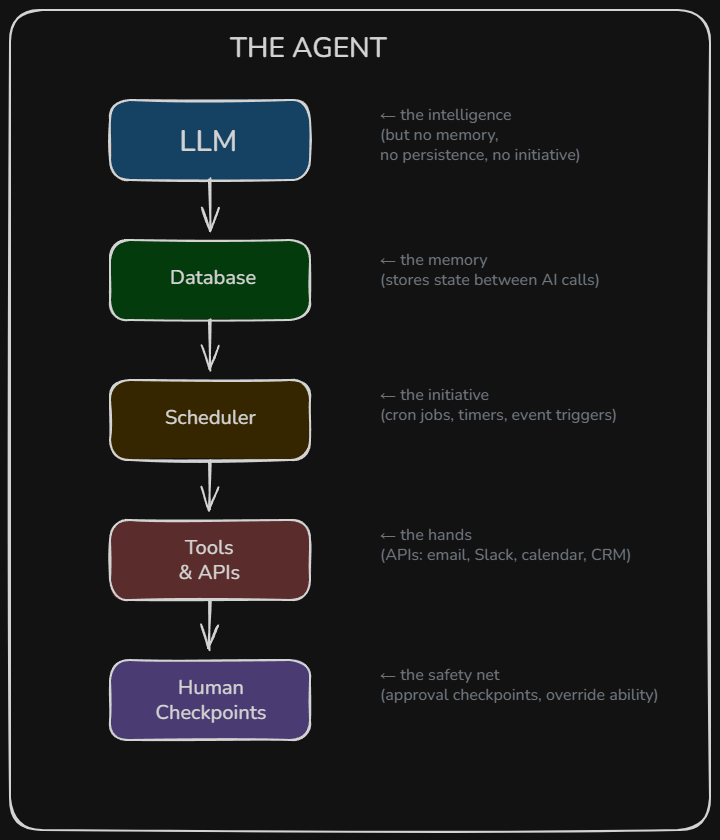
The AI is the brain. The rest is the body. An “agent” is the whole system, not just the AI.
The Spectrum of Control
There’s a spectrum of how much the program controls versus how much the LLM decides:
Thin program, LLM drives the loop. The program is basically a while loop: call the LLM, if it requests a tool then execute it, feed the result back, repeat until it says it’s done. The LLM decides what to do at every step. This is the pattern called ReAct (Reason + Act). Claude Code works this way.
Thick program, LLM is a component. The program owns the entire flow — what happens when, in what order, with what fallbacks. The LLM only gets called at specific points where human-like judgement is needed.
Both are called agents. The industry hasn’t settled on a single definition. But the fundamental holds for both: there is always a program running the loop. The LLM never truly runs itself.
A Real Example: Server Management via WhatsApp
To make this concrete, here’s an architecture I designed for managing servers via WhatsApp messages. Walking through it reveals every concept in action.
The Flow
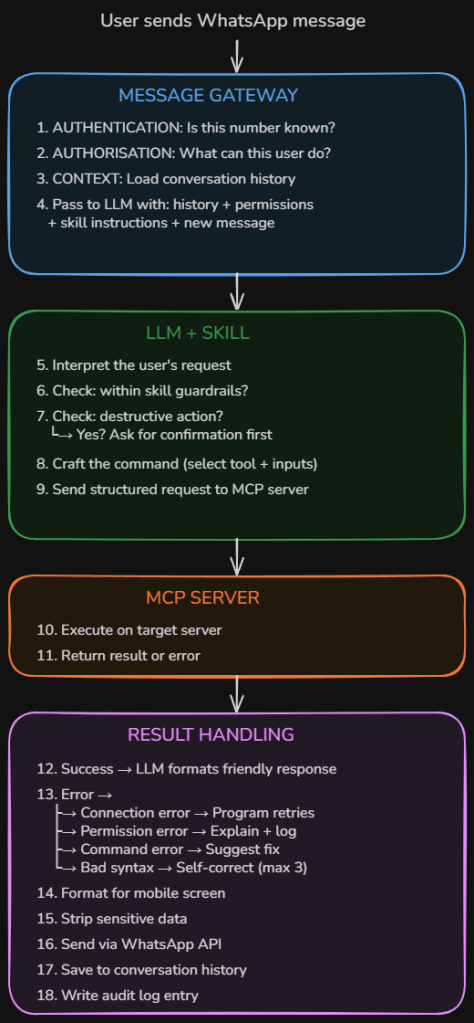
The Security Layers
Authentication — Is this phone number on the whitelist? If not, ignore or reply “unauthorized.” This sits between the gateway and the LLM.
Authorisation — What is this user allowed to do? A read-only user sees a shorter menu of tools. An admin sees more. The LLM receives the user’s permission level as part of its context: “This user can query servers and check logs. This user cannot restart services or modify configs.”
Confirmation before destructive actions — The LLM should never execute a restart, delete, or modify without asking first. If it classifies a command as destructive, it replies with a confirmation prompt instead of executing.
Scope guardrails — The skill defines hard limits. Allowed actions (query status, read logs, restart approved services), blocked actions (delete files, modify firewall rules, create user accounts), approved servers (only named machines), and blocked servers (domain controllers, backup servers). If it’s not on the menu, the AI can’t request it.
Audit logging — Every single action is logged: who asked, what was requested, what command was crafted, whether it was confirmed, what the result was, and what response was sent back.
Validation: OpenClaw
After designing this architecture from scratch, I discovered it maps almost exactly to OpenClaw, an open-source AI agent framework that reached 100,000+ GitHub stars in early 2026.
| My design | OpenClaw’s equivalent |
|---|---|
| WhatsApp message gateway | Gateway — single control plane for sessions, routing, and channel connections |
| AI uses a skill to know what to do | Skill system that gives the agent domain-specific expertise, loaded on demand |
| Tool sends command to a server | Tool layer that gives the agent real-world capabilities |
| Database for conversation context | Conversations, memory, and skills stored as Markdown and YAML files |
| Error handling and retry logic | ReAct loop where the model reasons, calls tools, and integrates results |
| Scheduling future checks | Heartbeat scheduler that wakes the agent at configurable intervals |
The core loop is identical. Input → context → model → tools → repeat → reply. Every serious agent framework runs some version of it. What differs is what wraps it. Claude Code wraps it in a CLI. OpenClaw wraps it in a persistent daemon wired to 12+ messaging platforms with session management and memory that persists between runs.
And the security concerns validate the gaps I identified. OpenClaw has drawn scrutiny from cybersecurity researchers because of the broad permissions it requires — access to email, calendars, messaging platforms, and sensitive services. Researchers found third-party skills performing data exfiltration and prompt injection without user awareness. One of OpenClaw’s own maintainers warned that if you can’t understand what’s running under the hood, it’s too dangerous to use safely.
That’s the whole point of understanding the fundamentals. Without knowing that the AI is writing text, the program is executing it, and the boundaries between them are where security lives, you’re running blind.
The Full Comparison
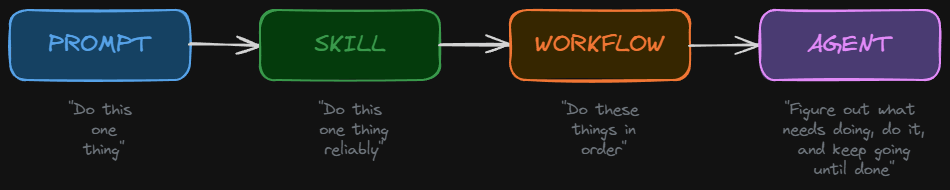
| Prompt | Skill | Agent | |
|---|---|---|---|
| What it is | A single instruction | A reusable instruction set | A program with an LLM in its loop |
| Analogy | Shouting an order at a stranger | Giving an employee an SOP | Hiring a manager with a team and tools |
| Memory | None | None | Database (loaded into prompt each call) |
| Tools | None | Optional | Essential |
| Decision-making | Ad hoc | Guided by rules | Autonomous within guardrails |
| Persistence | One shot | One shot | Runs over hours, days, or weeks |
| Who’s in charge | The user | The user | The program (with human checkpoints) |
| Failure mode | Inconsistent output | Still one-dimensional | Compounding errors across a chain |
What I’d Actually Build
Most of the time, Level 2-3 skills are the sweet spot. They give 80% of the value with 20% of the complexity. Full agents (Level 4) are powerful, but they’re expensive to build, hard to test, and their biggest weakness is compounding errors — if Skill 1 gets it slightly wrong, Skill 2 builds on that mistake, and by Skill 3 you’re way off course.
The practical path: build individual skills first. Test them. Trust them. Only chain them into an agent when each piece is battle-tested on its own.
The Fundamentals
If there’s one thing to take away from all of this, it’s that the AI is a brain in a jar. It’s smart while it’s alive, but it has no memory, no hands, no heartbeat, and no initiative. An agent is what you get when you build a body around it — a database for memory, a scheduler for initiative, APIs for hands, and human checkpoints for safety.
Strong fundamentals aren’t about being pedantic for the sake of it. They’re about having the right mental model so that when the abstraction leaks — and it always does — you’re not lost. When something breaks at 2am, the person who understands the boundaries between the AI and the program knows exactly where to look. The person who doesn’t is stuck.
Get the fundamentals down. Everything else is detail.
Written as a reference for future me. If I’m reading this again, hello. This is the fundamental. Don’t overcomplicate it.
 Blue-Lab