

If you’ve ever needed to access a machine on a private network that you can’t reach directly, SSH local port forwarding is one of the cleanest ways to do it. It’s a single command, no VPN client required, and it slots naturally into a privileged access workflow.
The command
ssh -N -L 3390:192.168.10.10:3389 mrbot
That’s it. Let’s break it down.
ssh— open an SSH connection-N— don’t open a shell on the remote host, just hold the tunnel open-L 3390:192.168.10.10:3389— bind local port 3390, and forward traffic through the SSH host to 192.168.10.10 on port 3389mrbot— the SSH jump host that bridges the two networks
Once this is running, you point your RDP client at localhost:3390 and you’re connected to the target machine’s desktop as if you were sitting on the same network.
How the traffic flows
When you run this command, two things happen on your machine — and understanding both is what makes the whole pattern click.
First, SSH establishes a normal outbound connection from your machine to mrbot on port 22. That’s a standard SSH session, encrypted end to end. The -N flag just tells it not to open a shell — hold the connection open and do nothing else.
Second, the -L flag tells the SSH process to create a local listener on port 3390 on your machine. This is the clever part: that listener is wired internally back into the SSH connection on port 22. Anything that connects to localhost:3390 gets picked up by the SSH process, encrypted, and multiplexed into the existing port 22 tunnel.
So the full flow is:
- Your RDP client connects to
localhost:3390— a port on your own machine. - The SSH process, which owns that listener, picks up the traffic and wraps it into the encrypted SSH connection on port 22.
- The encrypted traffic travels over port 22 to
mrbot, crossing the firewall. mrbotreceives it on its port 22, decrypts it, and sees that it’s forwarded traffic destined for192.168.10.10:3389.mrbotopens a plain connection to the target and delivers the RDP traffic.
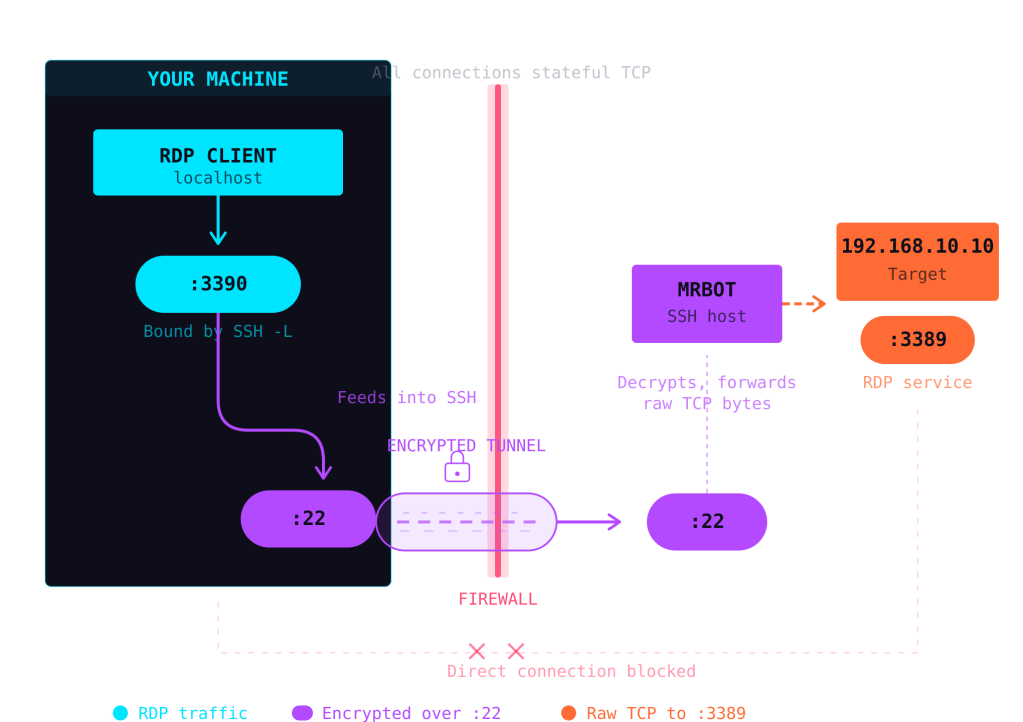
The key insight is that both :3390 and :22 live on your machine. The SSH process bridges them internally — :3390 is just a local entry point that feeds into the encrypted :22 pipe. From the network’s perspective, the only thing crossing the firewall is a single SSH connection. The RDP traffic is invisible inside it.
Your machine never talks to the target directly. mrbot straddles the network boundary — reachable from your side over SSH, and able to reach the private network on the other side.
Why not just open the port?
You could punch a hole in the firewall and expose RDP directly. But RDP has a long history of vulnerabilities, and exposing it to the internet is consistently one of the top initial access vectors in ransomware campaigns. SSH port forwarding keeps port 3389 completely unexposed while still giving you access through an authenticated, encrypted channel.
Fitting this into a privileged access workflow
SSH tunnels aren’t just a sysadmin convenience trick — they map well onto a formal Privileged Access Management (PAM) architecture. Here’s how.
The jump host as a control point
In a PAM workflow, you don’t want administrators connecting directly to sensitive systems. Instead, all privileged sessions route through a controlled intermediary — often called a jump host, bastion host, or privileged access workstation.
mrbot in our example is exactly that. By funnelling all RDP access through a single SSH entry point, you create a natural chokepoint where you can enforce policy.
What you can layer on top
With mrbot as your control point, you can add:
Authentication and authorisation — Require SSH key-based authentication (disable password auth entirely). Pair this with short-lived certificates from a CA like HashiCorp Vault or Smallstep, so access is granted per-session rather than permanently.
Session recording — Tools like Teleport, CyberArk, or even a simple script command on the jump host can record the full session. For RDP specifically, you can combine the SSH tunnel with a session recording gateway on the private side.
Just-in-time access — Instead of leaving the tunnel permanently available, integrate with a request/approval workflow. An engineer requests access, a manager approves it, and a short-lived SSH certificate is issued that expires after the maintenance window. No standing privileges.
Audit logging — SSH logs every connection to mrbot with timestamps and source IPs. Combine this with your SIEM, and you have a clear trail of who accessed what, when, and from where.
Network segmentation — The target machine (192.168.10.10) never needs to be reachable from the internet. It only needs to accept connections from mrbot on the private network. This dramatically reduces the attack surface.
A practical example
Imagine a small infrastructure team managing Windows servers in a private cloud environment. Their PAM workflow might look like this:
- Engineer authenticates to an identity provider and requests RDP access to a production server.
- The request triggers an approval in Slack or a ticketing system.
- On approval, a short-lived SSH certificate is issued (valid for 4 hours).
- The engineer runs
ssh -N -L 3390:192.168.10.10:3389 mrbotusing the temporary certificate. - They connect via RDP to
localhost:3390, complete their work, and disconnect. - The certificate expires. The tunnel is no longer usable.
- The full session is logged and auditable.
No VPN. No permanently open ports. No shared credentials. Every session is authenticated, time-boxed, and recorded.
When to use something else
SSH local port forwarding is excellent for small teams and straightforward access patterns. If you’re managing hundreds of servers or need granular role-based access across a large organisation, dedicated PAM platforms like CyberArk, Teleport, or BeyondTrust will give you more structure. But even at that scale, the underlying principle is the same: route privileged sessions through a controlled, auditable gateway rather than exposing services directly.
The takeaway
ssh -N -L 3390:192.168.10.10:3389 mrbot is a one-liner, but it encodes a solid security pattern: authenticate at the boundary, encrypt in transit, and never expose the target. Whether you’re a solo sysadmin or building out a formal PAM programme, it’s a tool worth having in your back pocket… 😉
 Blue-Lab